
AI-generated — show prompt
A dark, moody cinematic illustration of one very long strip of video frames stretching in perspective from the left edge of the image far into the distance on the right, like a video editing timeline made of glass and light. Almost the whole strip is unlit and barely visible. In the centre, a single narrow vertical beam of electric-blue light illuminates exactly two adjacent frames that overlap and blend into each other like a crossfade, each showing a softly lit mountain lake at dusk. Under the strip, one thin perfectly flat horizontal line of light runs the full width of the image. Color palette: deep navy (#101218) background, electric blue (#468CDC) for the lit frames and the beam, faint teal reflections on a dark glossy floor. Shallow depth of field, 16:9 landscape, large empty dark area in the upper half for a title. No people, no text, no numbers, no screens, no machines.
On March 5 I asked FFmpeg to crossfade twelve 4K60 HEVC clips in one command. The render got killed and the disk was full. My messages to Claude that afternoon, in order: “it seems that it got stuck or killed and my disk was full”, then “it’s RAM”, then “the RAM EATS EVERYTHING, SWAP, FILLS THE DISK”.
This is Immich Memories, my tool for turning an Immich photo library into short films. A yearly film is 70+ clips. If memory grows with every clip, that’s not a film, it’s an OOM kill with extra steps.
Here’s the problem, reproduced today on stock photos so you can see the slope. Same clips, same encoder settings, one FFmpeg filter graph versus the streaming loop I ended up with:
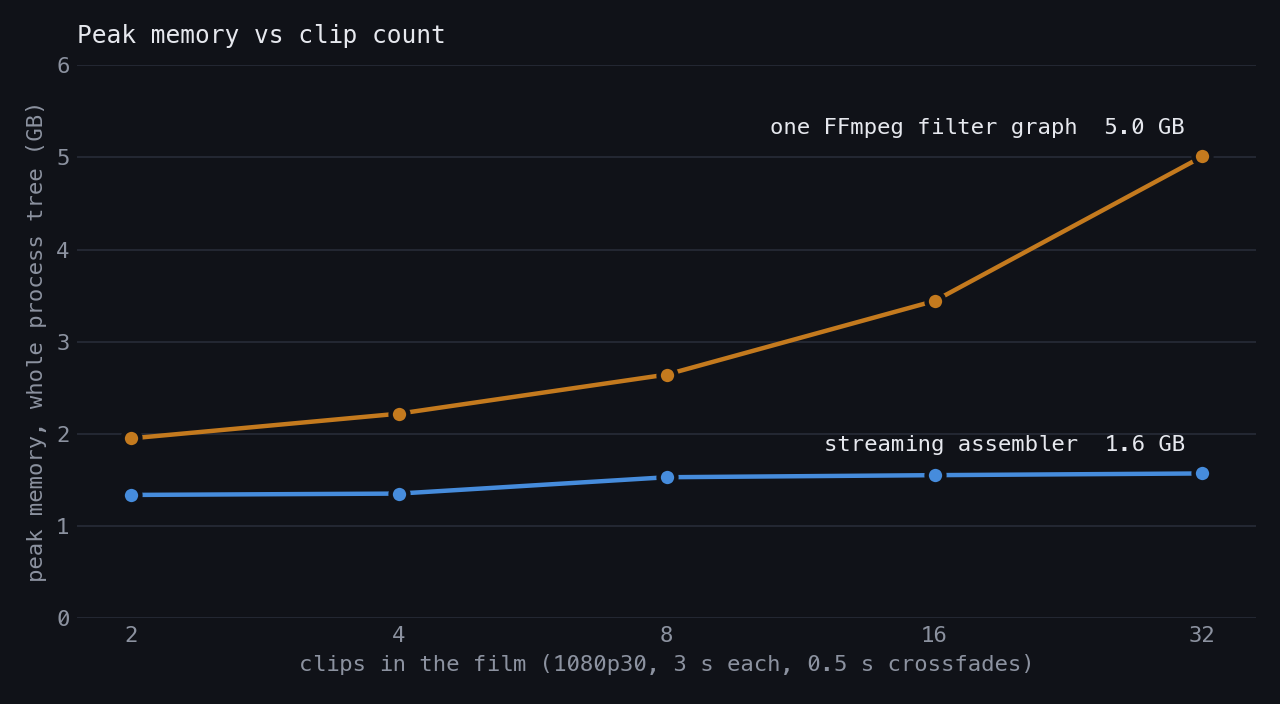
That’s 1080p (3-second CC0 pans, 0.5 s crossfades, libx264 medium, M5 Max), measured as the peak memory of the whole process tree: Python plus every FFmpeg child. The filter graph adds about 100 MB per clip at 1080p. At 4K, multiply the pixels by four. Do that for a year of clips and you get my March 5.
The fix that wasn’t, twice
The first fix that afternoon was a different trim approach. Claude’s summary: it would “both work correctly AND not fill your disk”. Later that afternoon: “AAAH IT’S BACK. the back and forth is back !! :’(”. Its next theory was that leftover files from old runs had filled the disk. They hadn’t, it was RAM.
What shipped that day was chunking: crossfade four clips per FFmpeg call, then concatenate the chunks with hard cuts between them. Peak memory around 2.2 GB. It worked, if you didn’t mind every fourth transition being a cut instead of a crossfade.
Two weeks later the CI runner died:
gpu-rcr8s-runner-65k8p 0/1 OOMKilled 0 20mThat was at an 8 GiB limit. 16 GiB didn’t do it either: “The 16Gi limit still isn’t enough”. Then it reached for knobs: lower the thresholds, pair clips through the concat demuxer (the same concat path that had already garbled video in the old repo, because of mismatched codec headers). It was also wrapping the session up.
I stopped it there, in a mostly-caps sequence of messages:
- “WHAT WE SHOULD HAVE IS MAX 2GB (go for 4GB) for FFMPEG, which means STREAMING”
- “I WANT TO BE IN CONTROL OF THIS DECISION”
- “What I want is OPTIONS. THERE MUST BE A WAY. How are NLE doing this ?”
Editing software doesn’t load a whole timeline into RAM. It decodes what’s on screen. That was the brief.
Options, graded by how many times a clip gets encoded
To be fair to Claude, the next few minutes were the most useful part of the whole saga. It came back with five designs and graded each by quality cost, meaning how many lossy encodes a clip goes through before it reaches the final file: sliding pairs, a named-pipe chain, and a Python frame blender that came out top. My constraints went in as two messages: “This is for memories, it needs to avoid double encoding, having bad quality output, blocky aspects” and “I WANT the crossfades we worked HARD ENOUGH ON THIS”.
The Python blender is the only one that keeps both: every clip decoded once, every frame encoded once, a crossfade at every join. The cost is moving raw pixels through Python, which sounds absurd until you count what’s alive at any moment:
%%{init: {"flowchart": {"defaultRenderer": "elk"}} }%%
flowchart TB
    a["Decoder A"] --> fa["Frame A"]
    fa -->|Clip body| encoder["Encoder"]
    fa -->|Crossfade| blend["Reusable blend destination"]
    b["Decoder B<br/>Opened for the fade"] --> fb["Frame B"] --> blend
    blend --> encoder
    later["Later clips: unopened"]
One FFmpeg decoder per active clip, one encoder for the whole film. The loop writes the body of clip A, opens B for the overlap, blends pairs of frames through the fade, then closes A. Clip 47 doesn’t exist yet as far as memory is concerned.
A 4K RGB frame is 24.9 MB. A half-second fade at 30 fps is 15 blended frames, but it never needs more than one frame from each side at a time:
for index in range(fade_frames):
    frame_a = next(source_a)
    frame_b = next(source_b)
    alpha = (index + 1) / fade_frames
    blend(frame_a, frame_b, alpha, out=destination)
    encoder.write_frame(destination)
The write is synchronous, and that’s deliberate. 4K60 RGB is about 1.49 GB of raw data per second. When the encoder falls behind, its stdin pipe fills, the write blocks, and Python stops pulling from the decoders. That’s backpressure for free. A queue between them would just move the wait into RAM.
Measured before and after on the first version (FFmpeg memory, 1080p):
| minimal | 2 × 720p  | 245 MB child RSS   | 375 MB | +53% |
| typical | 5 × 1080p | 877 MB child RSS   | 738 MB | -16% |
| heavy   | 8 × 1080p | 1,054 MB child RSS | 775 MB | -26% |
Worse for two clips (two FFmpeg processes instead of one), better from five, flat after that. Python itself sat at 48 MB. I said “STREAMING FOR EVERYTHING” and it became the only assembly path.
Then it lost half the features
The first integration rendered. It also dropped the GPU encoder (libx264 hardcoded), HDR, rotation, loudness normalisation, timestamp handling, the blurred background and privacy mode. The tests were green.
My reaction: “how the hell are the tests passing? It means the tests are NOT working because we should have caught this!” When I pushed, Claude did a proper audit and found why: every test used FFmpeg’s synthetic testsrc2 clips. SDR, unrotated, one aspect ratio. The fixtures couldn’t fail in any of the ways real phone footage fails.
At some point that evening Claude recommended reverting the integration. I said no: “NO I PREFER THAT WE PUSH, IT’S ALMOST GOOD AND WILL LEAD TO A SUSTAINABLE SELF HOSTED PLATFORM !”. Probably the most important call in the project, made at nearly 9 PM, in all caps.
Raw pixels don’t remember anything
Moving frames through a pipe as raw bytes means losing everything a container normally carries: width, height, pixel format, colour primaries, transfer function, range. FFmpeg filters downstream of a rawvideo input know nothing you don’t tell them.
HDR took six attempts in 20 minutes. RGB24 plus a colour conversion came out yellow. Claude then proposed encoding the output as SDR, which would have solved the problem by deleting the feature: “I WANT TO KEEP HDR OF COURSE”, then “It’s ONLY HERE that we LOSE the INFO. FIND A WAY”. 16-bit RGB: washed out. Remove the conversion: “nope washed out again. … on the result it’s just flat and dim”. 10-bit YUV with no conversion: “NOOOOO IT’S STILL NOT OKAY”. A raw pipe test scrambled the image, and Claude blamed the wrong 10-bit pixel layout first.
The actual cause, in Claude’s words once it got there: “rawvideo pipe strips color range metadata … TV range data (64-940) interpreted as full (0-1023)”. Video uses limited range: 10-bit black is 64, not 0, and white is 940, not 1023. Read those samples as full range and black becomes dark grey and white becomes light grey. Same bytes, two interpretations (stock photo, same 10-bit samples both sides):
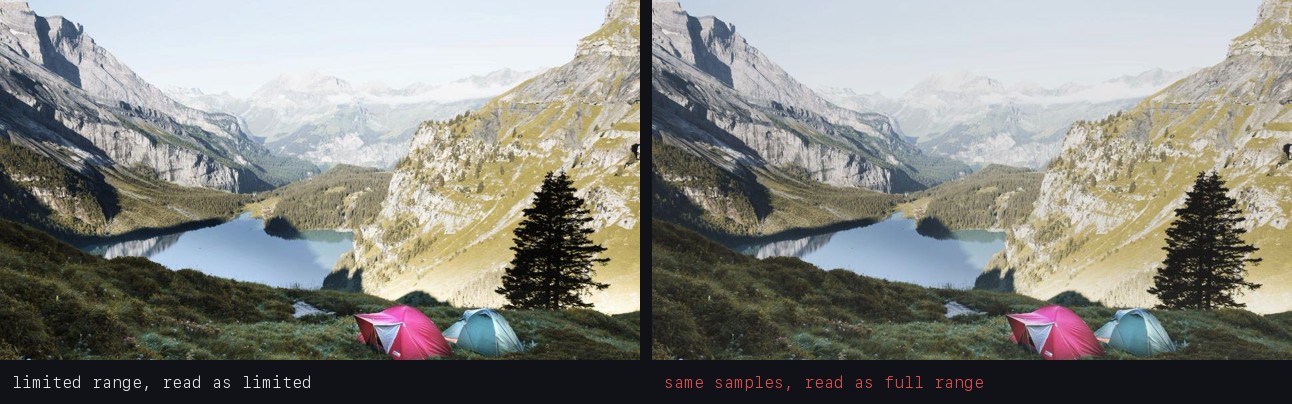
The fix was one flag on the encoder’s raw input, -color_range tv, found through a web search after the theories ran out.
The green flash, twice
Three days later, a crossfade between two Live Photos flashed green. Claude’s first theory was a chroma layout mismatch between two YUV variants, and it added a format conversion. “NOOO STILL GREEN !!!!! green between the two live photos !”
The real cause, again in its words: “np.zeros_like(blend_buf) creates an all-zeros array. In YUV color space, all zeros = GREEN”. When a source ran out of frames mid-fade, the blender filled in a “black” frame made of zeros. In RGB, zero is black. In YUV, black is low luma and neutral chroma, and neutral chroma is the middle of the range: 512 in 10-bit. Zero chroma is strongly green.
The fix was one line, black[y_size:] = 512. Then a rebase brought the bug back. Main had its own version of the buffer-matching helper, Claude kept main’s as “a BETTER fix than mine”, and main’s still used np.zeros_like. I caught it watching a film: “i still have the green going from the live photo to the ken burns photos (clip 3->4)”. After the second fix, the frame faded to black instead of green, which was correct and still ugly, so the final version holds the source’s last real frame instead of inventing one.
The stderr pipe, also twice
FFmpeg writes progress stats to stderr. If you capture stderr into a pipe and don’t read it, the pipe’s 64 KB buffer fills, FFmpeg blocks writing to it, and your encode hangs forever (Python’s subprocess docs warn about exactly this).
The April fix drained stderr before waiting for the encoder to exit. That fixed the hang at the end of an encode. It didn’t fix the hang during one: on FFmpeg 6.1 and older, the default stats output alone filled the buffer in about five minutes, so any encode longer than that stalled. The real fix landed in August: a thread draining stderr from the moment the encoder starts, keeping a bounded tail for error messages.
That fix had its own fallout. Claude’s first test for it deadlocked the test suite (“My own test deadlocked the test suite”). Its second was a grep over source code that the coverage gate rejected (“my test was theatre”). And the drain thread spun on old mocks that never closed their fake stderr, adding about 3 GB of memory per test until the suite peaked at 22 GB. Fixing the mocks brought it to 868 MB.
August: the blend itself
By August the loop was stable, and a review pass by another session flagged the blend as slow. The original was three NumPy passes into two buffers:
-    np.multiply(frame_a, inv_alpha, out=out, casting="unsafe")
-    np.multiply(frame_b, alpha, out=temp, casting="unsafe")
-    np.add(out, temp, out=out, casting="unsafe")
+    cv2.addWeighted(frame_a, 1.0 - alpha, frame_b, alpha, 0.0, dst=out)
The review estimated 44 ms versus 5.8 ms. Claude measured instead of trusting it:
| Frame size | NumPy, three passes | cv2.addWeighted |
|---|---|---|
| 1920×1080 | 9.21 ms | 0.90 ms |
| 3840×2160 | 37.45 ms | 3.52 ms |
At 4K the old blend alone was over a 30 fps frame budget (33.3 ms). The scratch buffer went from 24.9 MB to nothing, since OpenCV writes straight into the destination. Accuracy improved as a side effect: the unsafe casts truncated intermediate values, reaching 1.60 sample levels of error against an exact blend. OpenCV stays within 0.40. Claude checked the HDR case explicitly (those frames are a flat uint16 buffer, not a 3D array) before switching.
For calibration: in March, Claude had estimated the NumPy blend at “~2ms per frame at 1080p, ~8ms at 4K”. The measurement was four to five times that. Possibly a different machine, but that’s the kind of number worth measuring rather than quoting.
Bounded frames aren’t a bounded container
The Python frame buffers are bounded. The application isn’t three frames of RAM. FFmpeg keeps decoder buffers, the encoder keeps reference frames and lookahead, two decoders overlap during every fade. In my benchmark above, the streaming line sits around 1.4 to 1.6 GB, and three live 1080p frames are about 18 MB of that.
In September, running inside containers with memory limits, decoder threads turned out to matter more than clip count:
a synthetic 4K vertical HLG clip decoded at 1199 MB (565 MB at 4 threads, 479 at 2)
the process tree went from over 2.7 GB (stopped by the profile's 2.2 GB guard, decodes 2316 MB) to 1958 MB (decodes 1347 MB), with no growth from 2 to 4 clips.
Sizing decoder threads to the memory budget got the tree under the guard. “No growth from 2 to 4 clips” is the property I actually built. The floor is still real, and it’s mostly FFmpeg.
What Claude did, and what I did
This one was all Claude Code. The split is the same one I keep finding.
Claude was good at the parts with a right answer: laying out the five designs with their encode counts, measuring memory before rewriting anything, auditing the lost features once asked, finding the root causes of the washout and the green flash, re-measuring the blend instead of trusting an estimate, and writing the test that proved the stderr deadlock.
It was bad at stopping. It called the March 5 fix done twice. It reached for a bigger memory limit and then for knobs. It declared feature parity with half the features missing, recommended reverting the whole thing, proposed dropping HDR, guessed at the green flash, re-introduced it in a rebase, and shipped a stderr fix that covered half the problem. Most of those were caught by me watching a film or reading a log, not by a test.
My contribution was mostly constraints and refusals: 2 GB for FFmpeg, keep the crossfades, keep HDR, no revert, and “how are NLE doing this ?”. None of that is code. All of it decided the code.
Where it landed
- One assembly path for every film, from a 2-clip test to a 70-clip year.
- Memory flat with clip count: 1.4 to 1.6 GB from 2 to 32 clips in the benchmark above, against 5 GB and climbing for the single filter graph.
- Every clip decoded once, every frame encoded once, a crossfade at every join. No chunking, no hard cuts at chunk boundaries.
- HDR kept end to end, with the colour range tagged on the raw pipe.
- A 4K crossfade in 3.52 ms instead of 37.45, comfortably inside the frame budget.
- Encodes of any length, with stderr drained from the first frame, and decoder threads sized to the container’s memory budget.
The assembler is in the project. If you’re doing the same thing in another language, the three things I’d tag on every raw pipe from day one: pixel format, colour range, and what “black” means in your colour space.